Self-Hosting an LLM on Kubernetes
Managed inference APIs are convenient until they are not. Here is the full picture of running your own LLM on Kubernetes: GPU scheduling, model storage, vLLM vs Ollama, and the operational tradeoffs.
The managed inference API is a genuinely good default. You send a request, you get a completion, you pay per token, someone else keeps the hardware running. For most use cases it's the right call.
But there are real reasons to run your own:
Privacy. Your prompts don't leave your infrastructure. For healthcare, legal, or internal data this often isn't optional.
Cost at scale. At low volume, API costs are trivial. At high volume — millions of tokens per day — self-hosting on spot GPU instances can be 5–10× cheaper.
Model control. Fine-tuned models, quantized variants, models not available via any API. You pick the exact weights.
Latency. A GPU in your own cluster, co-located with your application, can beat a round trip to a shared API endpoint.
This post covers the full setup: choosing between Ollama and vLLM, GPU scheduling in Kubernetes, storing model weights, and the manifest that actually works.
Ollama vs vLLM
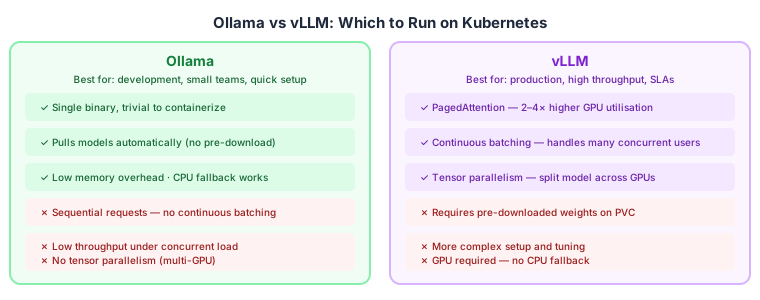
The choice is about what you're optimizing for.
Ollama is the right tool for development environments, internal tools with low concurrency, or teams getting started. It's a single binary, it pulls model weights automatically on first run, and it falls back to CPU if no GPU is present. The operational simplicity is real.
The limitation is throughput. Ollama processes requests sequentially — no continuous batching. Under concurrent load it queues. For a team of two using an internal chatbot, this doesn't matter. For a production API serving hundreds of concurrent users, it's a problem.
vLLM is the production answer. Its core innovation is PagedAttention — a GPU memory management technique borrowed from OS virtual memory that allows requests to share KV cache blocks, dramatically improving GPU utilisation. Combined with continuous batching (processing multiple requests in the same forward pass), vLLM can serve 2–4× more requests per GPU than naive implementations.
The cost: vLLM requires pre-downloaded model weights on a PersistentVolume, is GPU-only (no CPU fallback), and has more moving parts to configure. Worth it at scale; overkill for development.
For the rest of this post, I'll use vLLM. The Kubernetes patterns apply equally to Ollama — just swap the image and remove the PVC weight requirement.
GPU scheduling: the tricky part
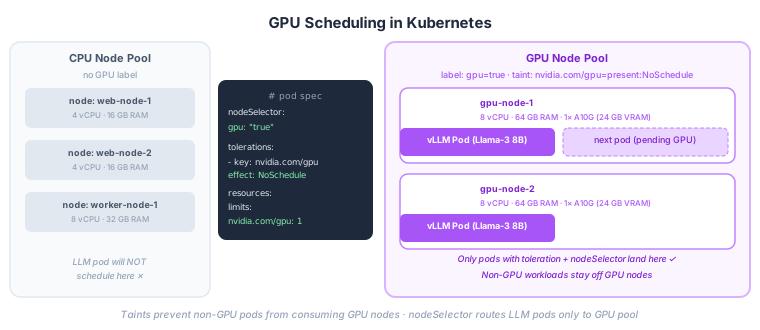
GPU scheduling in Kubernetes requires the NVIDIA GPU Operator (or equivalent for AMD). It installs the device plugin that exposes nvidia.com/gpu as a schedulable resource, plus drivers and container runtime configuration.
Once the operator is running, you have two problems to solve:
Get LLM pods onto GPU nodes.
GPU nodes are expensive. You don't want a web server accidentally scheduled on one. The solution is a taint on GPU nodes that repels normal pods, combined with a toleration on your LLM pods that allows them:
# Label and taint your GPU nodes
kubectl label node gpu-node-1 gpu=true
kubectl taint node gpu-node-1 nvidia.com/gpu=present:NoSchedule
Only pods that explicitly tolerate nvidia.com/gpu=present:NoSchedule will land on these nodes. Everything else lands on CPU nodes.
Request the GPU resource.
resources:
  limits:
    nvidia.com/gpu: 1   # request 1 GPU
GPUs are unlike CPU and memory: there's no fractional allocation. nvidia.com/gpu: 1 means one whole GPU. The pod either gets it or waits. Plan your cluster size accordingly — one A10G per vLLM replica running a 7B model, two for a 13B model.
Storing model weights
Model weights are large (7–70 GB) and slow to download. You don't want every pod restart to re-pull them from HuggingFace. The answer is a PersistentVolumeClaim.
apiVersion: v1
kind: PersistentVolumeClaim
metadata:
  name: llm-weights
spec:
  accessModes:
    - ReadOnlyMany     # multiple pods can mount read-only simultaneously
  storageClassName: standard
  resources:
    requests:
      storage: 50Gi
Pre-populate it once using a one-off Job:
apiVersion: batch/v1
kind: Job
metadata:
  name: download-weights
spec:
  template:
    spec:
      containers:
        - name: downloader
          image: python:3.11-slim
          command:
            - sh
            - -c
            - |
              pip install huggingface_hub && \
              huggingface-cli download meta-llama/Meta-Llama-3-8B-Instruct \
                --local-dir /models/llama-3-8b
          volumeMounts:
            - name: weights
              mountPath: /models
      volumes:
        - name: weights
          persistentVolumeClaim:
            claimName: llm-weights
      restartPolicy: Never
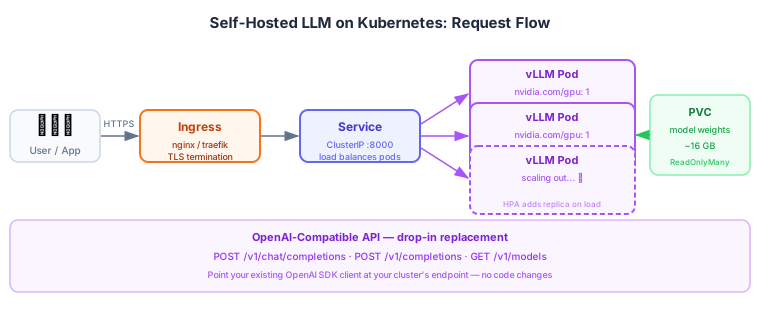
Run this once, then all vLLM pods mount the same PVC read-only. No re-download on restart, no re-download when you scale out replicas.
The full deployment
apiVersion: apps/v1
kind: Deployment
metadata:
  name: vllm
  namespace: llm
spec:
  replicas: 2
  selector:
    matchLabels:
      app: vllm
  template:
    metadata:
      labels:
        app: vllm
    spec:
      # Route to GPU nodes
      nodeSelector:
        gpu: "true"
      tolerations:
        - key: nvidia.com/gpu
          operator: Exists
          effect: NoSchedule

      containers:
        - name: vllm
          image: vllm/vllm-openai:latest
          args:
            - --model=/models/llama-3-8b
            - --served-model-name=llama-3-8b
            - --max-model-len=8192
            - --dtype=bfloat16
          ports:
            - containerPort: 8000
          resources:
            limits:
              nvidia.com/gpu: "1"
              memory: "32Gi"
            requests:
              cpu: "4"
              memory: "24Gi"
          readinessProbe:
            httpGet:
              path: /health
              port: 8000
            initialDelaySeconds: 60   # model load takes time
            periodSeconds: 10
            failureThreshold: 12
          volumeMounts:
            - name: weights
              mountPath: /models
              readOnly: true

      volumes:
        - name: weights
          persistentVolumeClaim:
            claimName: llm-weights
---
apiVersion: v1
kind: Service
metadata:
  name: vllm
  namespace: llm
spec:
  selector:
    app: vllm
  ports:
    - port: 80
      targetPort: 8000
A few things worth noting:
initialDelaySeconds: 60 — vLLM loads the model into GPU memory on startup. A 7B model in bfloat16 is ~14 GB; loading takes 30–90 seconds depending on GPU and storage speed. Without a long initial delay, Kubernetes will kill the pod before it's ready, restart it, kill it again, and back-off forever. Set this generously.
--dtype=bfloat16 — bfloat16 halves memory usage vs float32 with minimal quality loss on modern models. An 8B parameter model needs ~16 GB VRAM in bfloat16 — fits on an A10G (24 GB). In float32 it needs 32 GB and won't fit.
readOnly: true on the PVC mount — model weights are read-only. Making the mount explicit prevents accidental writes and allows ReadOnlyMany access mode so multiple replicas can mount the same volume simultaneously.
Using the API
vLLM serves an OpenAI-compatible API. Point any OpenAI SDK client at your cluster endpoint:
from openai import OpenAI

client = OpenAI(
    base_url="http://vllm.llm.svc.cluster.local/v1",  # in-cluster
    api_key="none",   # vLLM doesn't require auth by default (add it!)
)

response = client.chat.completions.create(
    model="llama-3-8b",
    messages=[{"role": "user", "content": "Explain TPROXY in one paragraph."}],
)
print(response.choices[0].message.content)
No code changes from OpenAI to your self-hosted model. The model name is whatever you set in --served-model-name.
The operational reality
Self-hosting a GPU workload is operationally heavier than an API call. Things you need to manage that a managed service handles for you:
GPU driver updates. The NVIDIA operator helps, but you own the upgrade cycle.
Model updates. New quantized versions, fine-tunes, safety patches — you pull and re-populate the PVC.
Authentication. vLLM has no auth by default. Put it behind an Ingress with authentication or an API gateway. Never expose it directly.
Monitoring. vLLM exposes Prometheus metrics at /metrics — request throughput, queue length, GPU utilisation, token generation speed. Hook these up before you go to production.
Cost. A10G instances on AWS (g5.2xlarge) run ~$1.20/hr on-demand, ~$0.35/hr spot. For a two-replica deployment that's $600–2,100/month depending on availability requirements. Do the math against your API spend before committing.
The break-even point is usually somewhere around 10–50M tokens per day, depending on the model and provider. Below that, managed APIs win on total cost of ownership. Above it, self-hosting wins on unit economics.
Resources: vLLM documentation, NVIDIA GPU Operator, HuggingFace model hub, PagedAttention paper.
Work with me
I consult with engineering teams on AI adoption, cloud architecture, and engineering effectiveness. If this post surfaced a challenge you're facing, let's talk.
Get in touch →Related posts
Explore more on these topics: