RAG in Production: How Retrieval-Augmented Generation Actually Works
LLMs don't know your data. RAG fixes that by turning your documents into a searchable knowledge base. Here is the full pipeline: chunking strategies, dense vs hybrid retrieval, re-ranking, and when to reach for graph-based RAG with LightRAG.
A language model trained on the internet knows a lot. It does not know your internal documentation, your product catalog, last week's support tickets, or anything that happened after its training cutoff. This is not a bug — it is a fundamental property of how these models work. The weights are fixed after training.
Retrieval-Augmented Generation (RAG) is the standard solution. Instead of asking the model to recall facts from memory, you retrieve relevant context at query time and hand it to the model as part of the prompt. The model becomes a reasoning engine over your data, not a storage system for it.
This changes the problem entirely. The quality of your answers depends far more on what you retrieve than on which model you use.
The full pipeline
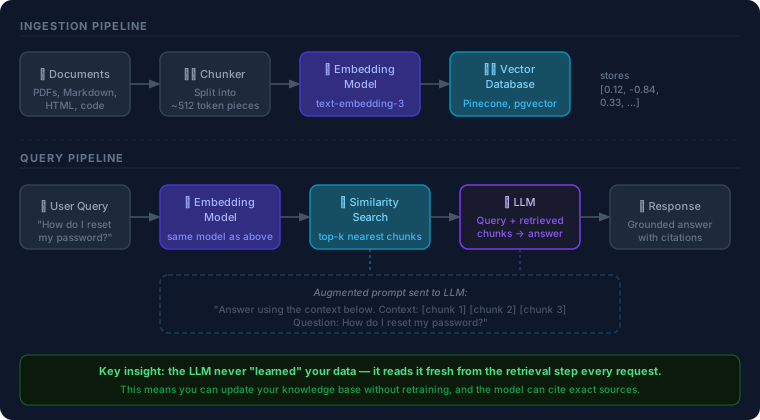
RAG has two distinct pipelines that run at different times.
Ingestion (runs once, then on update):
- Chunk your documents into pieces small enough for the context window
- Embed each chunk using an embedding model — turning text into a vector of floats that captures semantic meaning
- Store those vectors in a vector database alongside the original text
Query (runs on every user request):
- Embed the user's question using the same embedding model
- Search the vector database for the chunks whose vectors are most similar to the query
- Augment the prompt:
"Answer using this context: [chunks]. Question: [query]" - Generate — the LLM reads the retrieved context and produces a grounded answer
The model never touches your raw documents. It reads the retrieved excerpts fresh on every request. This means you can update your knowledge base without retraining, and — critically — the model can cite the exact source it used.
Chunking: the unglamorous decision that matters most
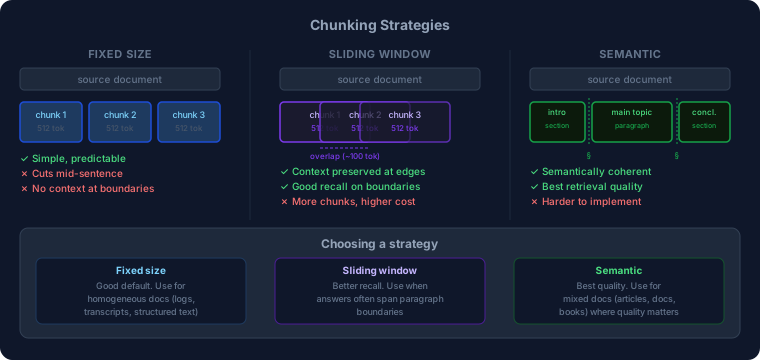
Before you can embed anything, you need to decide how to split your documents. This decision shapes retrieval quality more than your choice of embedding model or vector database.
Fixed-size chunking
Split every N tokens, hard stop. Simple to implement, predictable cost.
The problem: sentences get cut mid-thought. A chunk ending with "the key configuration option is" and the next chunk starting "—which defaults to false" will both retrieve poorly for questions about that option.
Use it for: homogeneous documents where structure doesn't vary much — transcripts, logs, structured data exports.
Sliding window
Same as fixed-size, but chunks overlap. A 512-token chunk with a 100-token overlap means each chunk shares 100 tokens with its neighbors on both sides.
This preserves context at boundaries. A question about something that straddles two fixed chunks is much more likely to find a match in a sliding-window setup.
The cost: more chunks means more storage and more tokens processed at query time. Worth it for most document corpora.
Semantic chunking
Split on meaning, not token count. Detect paragraph or section boundaries, keep related ideas together.
The simplest version: split on double newlines. More sophisticated: embed each sentence, and split when the cosine similarity between adjacent sentences drops below a threshold — a signal that the topic changed.
Semantic chunking produces the best retrieval quality but requires more implementation work. Use it when the documents are heterogeneous (articles, books, documentation) and retrieval quality is critical.
Practical defaults
Start with sliding window at 512 tokens, 100-token overlap, split on sentence boundaries. Measure retrieval quality — build a small eval set of question/answer pairs and check whether the right chunks rank in the top-3. Adjust chunk size based on what you find.
Retrieval: dense, sparse, and hybrid
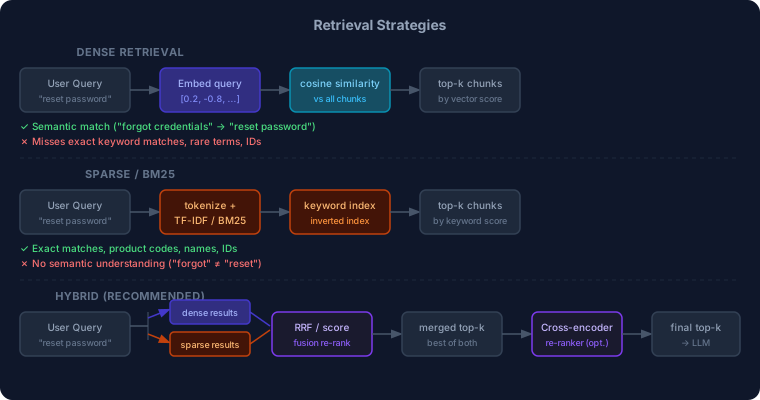
Once your chunks are embedded, you have options for how to retrieve them.
Dense retrieval (embedding similarity)
The default approach. Embed the query, compute cosine similarity against all chunk vectors, return the top-k closest.
The strength: semantic understanding. "I forgot my credentials" retrieves chunks about password resets even though no word overlaps. The embedding model has learned that these phrases are related.
The weakness: rare terms. If a user queries for a specific error code, version number, or product ID, the embedding might not capture the specificity well. Dense retrieval tends to return semantically similar but vaguely relevant chunks rather than the exact match.
Sparse retrieval (BM25 / keyword)
Classic information retrieval. TF-IDF or BM25 scores chunks by term frequency and rarity. No embeddings — it's a keyword index.
The strength: exact matches. Error codes, version numbers, names, and rare domain-specific terms score high when they appear verbatim.
The weakness: no semantic understanding. "Forgot credentials" does not match "reset password" unless both terms appear in the same chunk.
Hybrid retrieval
Run both, combine the scores. The standard method is Reciprocal Rank Fusion (RRF): rank each result set independently, then combine ranks with:
score = Σ 1 / (k + rank_i)
where k is typically 60. RRF is surprisingly robust — it doesn't require calibrating the relative weights of dense and sparse scores, since it operates on ranks rather than raw scores.
After fusion, an optional cross-encoder re-ranker takes the top-20 candidates and scores each one by running both the query and the chunk through a small model together (rather than separately). Cross-encoders are slower but more accurate — they can model query-chunk interaction directly. Re-rank to 20, return top-5 to the LLM.
This is the setup you want in production. The dense path catches semantic matches; the sparse path catches exact matches; the re-ranker picks the best of what's left.
Prompt design for generation
Retrieval quality is necessary but not sufficient. The prompt determines how well the model uses what you retrieved.
A pattern that works:
You are a helpful assistant. Answer the question using only the provided context.
If the answer is not in the context, say "I don't know" rather than guessing.

Context:
[SOURCE: docs/auth.md]
{chunk 1 text}

[SOURCE: docs/settings.md]
{chunk 2 text}

Question: {user question}
Three things worth noting:
Cite sources in the context. Including the source filename before each chunk lets the model attribute its answer and gives you a way to surface citations to the user.
"I don't know" is a feature, not a bug. Without the instruction, models hallucinate. With it, they surface their uncertainty — which is far more useful.
Order matters. Models attend more to the beginning and end of the context window. Put the most relevant chunk first and last if you can judge relevance before generation.
Failure modes
Retrieval returns the wrong chunks. The most common failure. Your eval set catches this — if the right chunk is not in the top-5, the model cannot answer correctly regardless of its capability. Debug by checking what the retriever actually returns, not the final answer.
Chunks are too long. A 2,000-token chunk that contains the answer buried in paragraph 8 is less useful than a 300-token chunk that is directly about the question. Shorter, more focused chunks improve precision.
Chunks are too short. A 50-token chunk lacks context — the model cannot understand it without surrounding information. 200–512 tokens is the practical range for most documents.
Missing metadata. Retrieving the right chunk is useless if you don't know where it came from. Always store the source document, section, and URL alongside the vector. Surface this in the UI.
Stale index. Your knowledge base updates; your vector index does not, unless you built the pipeline for it. Decide upfront whether you need real-time indexing (streaming updates, re-embed on change) or batch re-indexing (nightly job). Most internal tools are fine with nightly.
LightRAG: when relationships matter
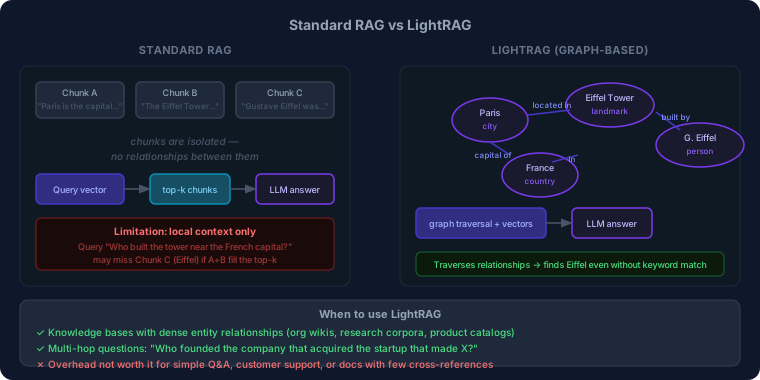
Standard RAG treats chunks as isolated units. That works when queries are about a single topic. It breaks down when the answer requires connecting multiple entities across documents.
Example: "Who founded the company that built the tool we use for deployments?" Standard RAG needs to retrieve chunks about the deployment tool, chunks about the company, and chunks about the founder — and those might be three different documents with no shared keywords or nearby vectors.
LightRAG (paper, repo) adds a knowledge graph layer alongside the vector index. During ingestion, an LLM extracts entities and relationships from each chunk:
- Entity:
Paris, type:city - Entity:
Eiffel Tower, type:landmark - Relationship:
Eiffel Tower→located in→Paris
At query time, LightRAG runs both vector retrieval and graph traversal. If the vector search finds Eiffel Tower, the graph traversal automatically follows edges to related entities (Gustave Eiffel, France, 1889) — even if those entities don't appear in any top-ranked vector result.
This gives multi-hop reasoning for free. The LLM gets a richer, more connected context without needing to ask follow-up questions.
The tradeoff: graph construction costs extra LLM calls during ingestion (to extract entities and relationships). For a 10,000-document corpus this adds up. And the extraction quality depends on your LLM — weak models produce noisy graphs.
Use LightRAG when:
- Your knowledge base has dense entity relationships (org wikis, research corpora, product catalogs with parts and suppliers)
- Users ask multi-hop questions ("which team owns the service that calls this API?")
- Standard RAG keeps missing answers that require connecting two or more documents
Stick with standard RAG when:
- Questions are self-contained and answered within a single document section
- Your corpus is simple: a single domain, flat structure, mostly independent chunks
- You need a working system today — LightRAG adds operational complexity
Choosing a vector database
For most projects the choice of vector database matters less than the retrieval strategy. That said:
pgvector — if you already run Postgres, add the extension and you have a vector store. No new infrastructure. Handles millions of vectors fine. Missing: native BM25 (use pg_bm25 / ParadeDB for hybrid), advanced filtering.
Pinecone — managed, scales to billions of vectors, supports hybrid search out of the box. Costs money. Right for teams that don't want to operate infrastructure.
Weaviate / Qdrant — open-source, self-hosted, support hybrid search natively. Good middle ground between pgvector simplicity and Pinecone scale.
Chroma — developer-friendly, minimal setup, great for local development and prototyping. Not designed for production scale.
Start with pgvector if you're on Postgres. Migrate if you outgrow it.
A minimal working system
from openai import OpenAI
import psycopg2

client = OpenAI()

def embed(text: str) -> list[float]:
    return client.embeddings.create(
        model="text-embedding-3-small",
        input=text
    ).data[0].embedding

def retrieve(query: str, conn, k: int = 5) -> list[dict]:
    q_vec = embed(query)
    with conn.cursor() as cur:
        cur.execute("""
            SELECT content, source,
                   1 - (embedding <=> %s::vector) AS score
            FROM chunks
            ORDER BY embedding <=> %s::vector
            LIMIT %s
        """, (q_vec, q_vec, k))
        return [{"content": r[0], "source": r[1], "score": r[2]}
                for r in cur.fetchall()]

def answer(query: str, conn) -> str:
    chunks = retrieve(query, conn)
    context = "\n\n".join(
        f"[SOURCE: {c['source']}]\n{c['content']}"
        for c in chunks
    )
    resp = client.chat.completions.create(
        model="gpt-4o",
        messages=[
            {"role": "system", "content":
                "Answer using only the provided context. "
                "Say 'I don't know' if the answer isn't there."},
            {"role": "user", "content":
                f"Context:\n{context}\n\nQuestion: {query}"}
        ]
    )
    return resp.choices[0].message.content
This is a working dense retrieval system in ~40 lines. The <=> operator is pgvector's cosine distance. Add BM25 via ParadeDB's paradedb.bm25_score to get hybrid retrieval. Add a cross-encoder re-ranker (e.g. cross-encoder/ms-marco-MiniLM-L-6-v2 via sentence-transformers) on top of that for production quality.
RAG is not magic. It is a retrieval problem with an LLM at the end. The model can only reason over what the retriever surfaces. Build your eval set early, measure retrieval quality directly, and treat the retrieval pipeline as the first-class engineering problem it is — not an afterthought.
Further reading: LightRAG paper, pgvector documentation, Sentence Transformers cross-encoders, BEIR benchmark for evaluating retrieval.
Work with me
I consult with engineering teams on AI adoption, cloud architecture, and engineering effectiveness. If this post surfaced a challenge you're facing, let's talk.
Get in touch →Related posts
Explore more on these topics: