How Transparent Proxies Work (And Why You're Probably Behind One Right Now)
Every HTTP request you make likely passes through a proxy you never configured. Here is the network-level mechanism — iptables NAT REDIRECT, TPROXY, Squid in action, and why HTTPS only partially protects you.
Most developers know what a proxy is: a middle server that relays traffic between client and destination. But the proxy you're thinking of — the one where you configure HTTP_PROXY=http://proxy.corp:8080 — requires the client to cooperate. It knows the proxy exists. It sends a CONNECT tunnel request. It routes deliberately.
A transparent proxy intercepts traffic without any of that. No environment variables. No browser settings. No cooperation from the client. The packet leaves your machine addressed to 93.184.216.34:80 and gets silently diverted before it ever reaches the internet.
You've almost certainly been through one today. Corporate networks, university campuses, ISPs in bandwidth-constrained regions, and every CDN on the internet use them. Understanding the mechanism changes how you think about latency, logging, and what "private" actually means on a managed network.
What makes a proxy "transparent"
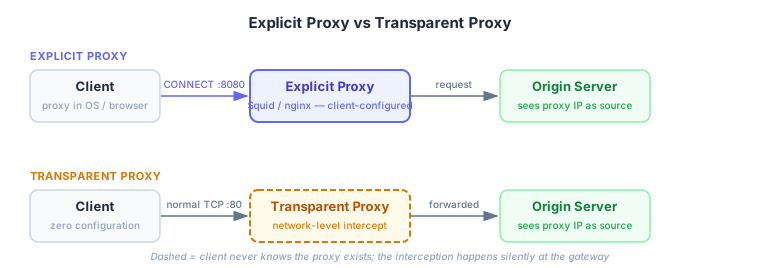
The word "transparent" means transparent to the client — invisible, unconfigured, unacknowledged. Two properties define it:
No client configuration. An explicit proxy requires the client to know a proxy address and send traffic there deliberately. A transparent proxy requires nothing from the client. The client opens a connection to the destination IP and port, and from its perspective, that's exactly what happens.
Same observable behavior from the client's side. The TCP connection succeeds. HTTP responses come back. The client has no signal that something intercepted the connection. The interception is invisible.
From the server's side, both look the same: the source IP is the proxy's IP, not the original client's.
How the interception works

Transparent interception happens at the network layer, below the application. Two main mechanisms:
iptables NAT REDIRECT
The most common setup for a single-machine transparent proxy — one machine acts as both gateway and proxy. iptables intercepts packets in the PREROUTING chain before they leave:
iptables -t nat -A PREROUTING -i eth0 -p tcp --dport 80 \
  -j REDIRECT --to-ports 3128
This rule matches every TCP packet destined for port 80 arriving on eth0, and rewrites its destination to 127.0.0.1:3128 — the local Squid process. The packet never leaves the machine; it's redirected inward.
The proxy needs to know where the packet was originally going. The kernel preserves this: getsockopt(SO_ORIGINAL_DST) returns the original destination IP and port even after REDIRECT has rewritten it.
struct sockaddr_in orig_dst;
socklen_t len = sizeof(orig_dst);
getsockopt(client_fd, SOL_IP, SO_ORIGINAL_DST, &orig_dst, &len);
// orig_dst now contains 93.184.216.34:80
Squid then opens a new TCP connection to the original destination on the client's behalf. The client never knows.
TPROXY (router-level)
REDIRECT has a limitation: it rewrites the destination IP to the local machine. This makes the proxy receive packets addressed to itself rather than to the original destination. For router-level interception where you want to preserve more of the original flow, TPROXY is cleaner:
# Mark intercepted packets
iptables -t mangle -A PREROUTING -p tcp --dport 80 \
  -j TPROXY --tproxy-mark 0x1 --on-port 3128

# Route marked packets to local stack
ip rule add fwmark 0x1 lookup 100
ip route add local 0.0.0.0/0 dev lo table 100
TPROXY doesn't rewrite the destination — it delivers the packet to the proxy with the original destination IP intact. The proxy socket is bound with IP_TRANSPARENT, which lets it accept connections destined for addresses it doesn't own. The kernel does the routing sleight-of-hand.
No SO_ORIGINAL_DST needed — the proxy sees the real destination directly. This is the mechanism routers use when they're acting as network-level transparent proxies for an entire subnet.
Squid in action
Squid is the canonical transparent proxy implementation, used in corporate gateways and ISP caches for decades. A minimal transparent config:
# Tell Squid this port receives redirected traffic (not CONNECT tunnels)
http_port 3128 intercept

access_log /var/log/squid/access.log
cache_log  /var/log/squid/cache.log

# Cache settings
cache_mem 256 MB
maximum_object_size 50 MB
cache_dir ufs /var/spool/squid 10000 16 256

# Access control
acl localnet src 192.168.0.0/16
http_access allow localnet
http_access deny all
The intercept keyword is what distinguishes transparent mode from explicit proxy mode. It tells Squid to use SO_ORIGINAL_DST to find the real destination rather than expecting a Host header or CONNECT request.
With iptables REDIRECT redirecting packets to Squid, the proxy can:
- Cache responses — the original ISP use case. A popular resource gets fetched once; thousands of clients get it from cache.
- Filter by URL — block categories, enforce acceptable-use policies without any client configuration.
- Log all HTTP requests — full URL-level visibility for compliance and auditing.
- Enforce bandwidth limits — per-client or per-destination rate limiting.
- Modify responses — inject or strip headers, rewrite redirect URLs.
For HTTPS, none of this works — the proxy can only see the destination IP and the SNI field in the TLS handshake. It can block destinations but not inspect content. Unless it does MITM.
Real-world deployments
Corporate networks. Almost every large enterprise runs a transparent proxy. Employee traffic routes through a Squid, Zscaler, or Palo Alto device before reaching the internet. Employees configure nothing; the network enforces it. The proxy logs every URL, blocks categories defined by policy, and typically performs TLS inspection (see below).
ISP caching. Still common where last-mile bandwidth is expensive or constrained. An ISP caches popular content at their egress points — YouTube, Windows Update, popular streaming CDNs. A request for a cached resource never traverses the backbone. Less effective now that most content is HTTPS.
Cloudflare.
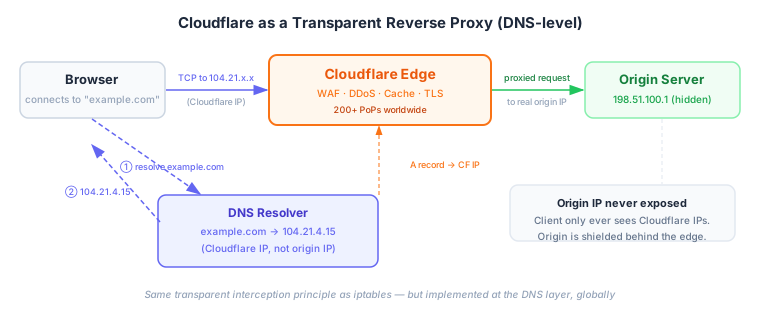
Cloudflare is a transparent reverse proxy operating at DNS scale. You set your domain's DNS records to point at Cloudflare's IP space. When a client resolves example.com, they get a Cloudflare IP, not your origin's IP. The client connects to Cloudflare; Cloudflare connects to your origin.
The client never knows Cloudflare is in the path. They see example.com resolving to an IP and connect successfully. The interception happens at DNS. Same principle as iptables REDIRECT — the mechanism is different, but the property is identical: transparent to the client.
The HTTPS problem
A transparent HTTP proxy reads and modifies everything. A transparent HTTPS proxy reads nothing — by design.
When a client opens a TLS connection to example.com, the server presents a certificate. The client validates the certificate chain against trusted Certificate Authorities. A transparent proxy in the middle cannot present a valid certificate for example.com — it doesn't have the private key. The TLS handshake fails or returns a certificate error.
This is TLS working correctly. The transparent proxy is defeated.
Except when the proxy is your employer.
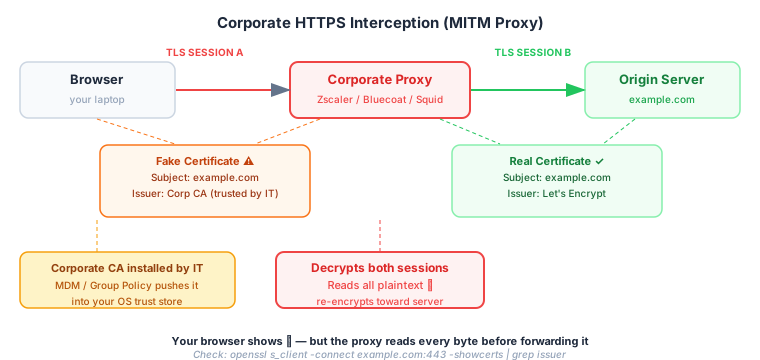
Corporate MITM proxies solve this with two steps:
- Generate a fake certificate for every HTTPS destination on the fly, signed by a corporate CA the proxy controls.
- Install the corporate CA into the trust store of every managed machine — via MDM, Active Directory Group Policy, or device enrollment.
Now the handshake completes:
- Client connects to proxy
- Proxy presents "Fake cert for example.com, signed by Corp CA"
- Client trusts Corp CA (installed by IT), validates successfully
- Client establishes TLS to the proxy — which can now decrypt it
- Proxy opens a second TLS session to the real server with the real cert
- Proxy decrypts, inspects, re-encrypts, logs, filters
Your browser shows the lock icon. The URL is https://example.com. Everything looks normal. The corporate proxy has read every byte.
How to check if you're being MITM'd:
openssl s_client -connect example.com:443 -showcerts 2>/dev/null \
  | openssl x509 -noout -issuer
If the issuer isn't a recognized CA — Let's Encrypt, DigiCert, Sectigo, GlobalSign — and instead shows "Zscaler Root CA", "Blue Coat Systems", your company name, or an internal CA, something is in the middle.
How to detect a transparent proxy
Three methods work reliably:
1. Check your external IP
curl -s https://api.ipify.orgIf the returned IP doesn't match your expected exit point (ISP address, VPN endpoint), traffic is being NATted through a proxy's outbound IP.
2. Look for proxy headers in responses
curl -s https://httpbin.org/headers | grep -i 'via\|x-forwarded\|x-cache'Squid often adds Via: 1.1 squid/5.x (...) or X-Forwarded-For headers. Well-configured proxies strip these for privacy, so absence isn't proof of absence.
3. Inspect TLS certificate chains for HTTPS
The MITM check above is the most reliable signal for corporate environments. A corporate MITM proxy will always reveal itself in the certificate chain — it has to, to make TLS work.
Transparent proxies are one of those infrastructure layers that work so well you never notice them — until you're debugging a latency spike, a missing header, or a mysteriously blocked request. The packet you think is going directly to the server might be traversing a Squid cache on your office router, a Cloudflare edge node 15ms away, or a corporate inspection appliance that logs every URL you visit.
Understanding the mechanism — NAT REDIRECT, TPROXY, SO_ORIGINAL_DST, the corporate CA trick — gives you the tools to see what's actually in the path. And sometimes that changes what "private browsing" means in a meaningful way.
Further reading: Squid transparent proxy configuration, Linux TPROXY kernel docs, Cloudflare network architecture.
Work with me
I consult with engineering teams on AI adoption, cloud architecture, and engineering effectiveness. If this post surfaced a challenge you're facing, let's talk.
Get in touch →Related posts
Explore more on these topics: