Docker Gets You to Production. Kubernetes Keeps You There.
Docker solves the packaging problem. Kubernetes solves the operational problem. Here is what K8s actually adds, how its core objects work, and why rolling updates change how you think about deployments.
Docker was a genuine paradigm shift. Before it, "it works on my machine" was a standing joke with no good answer. After it, you could package an application with its entire runtime environment and ship it anywhere. That problem is solved.
But Docker on its own answers one question: how do I run a container? It doesn't answer what happens when you need to run fifty of them, across multiple machines, and one crashes at 3am, and you need to update them without taking down the service.
That's what Kubernetes is for.
The gap Docker doesn't fill
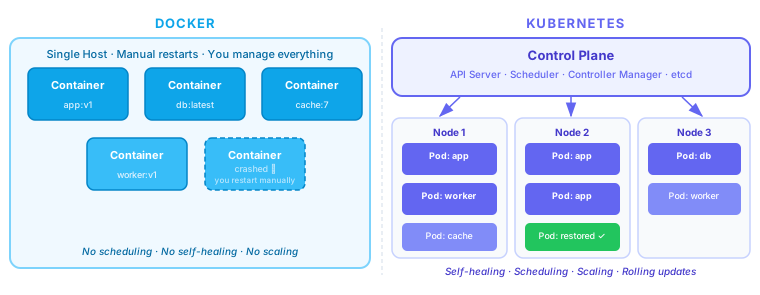
Run a single container with Docker and everything is simple. Add five more and it's still manageable. But as soon as you care about:
- Availability — what restarts a container when it crashes?
- Scale — what adds containers when traffic spikes?
- Updates — how do you replace running containers without dropping requests?
- Distribution — how do you spread load across machines?
- Discovery — how does service A find service B when B's IP keeps changing?
...Docker alone gives you nothing. You're reaching for shell scripts, cron jobs, and manual SSH sessions. That's the gap Kubernetes fills.
The fundamental shift is from imperative to declarative. With Docker you say "run this container." With Kubernetes you say "I want three replicas of this container running at all times, with at least 0.5 CPU and 512MB RAM each, accessible on port 8080." Kubernetes continuously works to make reality match that declaration.
The architecture
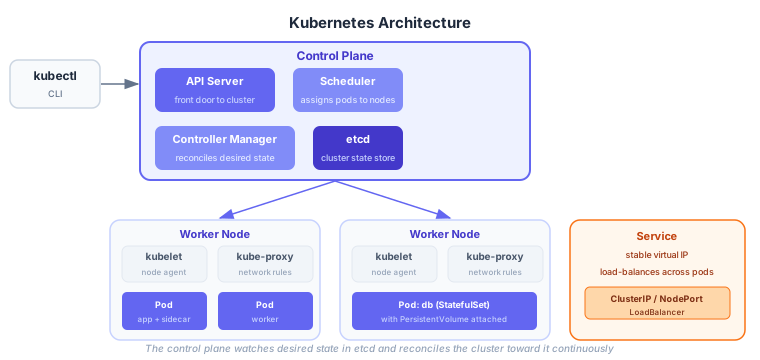
A Kubernetes cluster has two layers:
Control Plane — the brain. You never run your workloads here. It runs the machinery that manages the cluster:
- API Server — the only entry point to the cluster.
kubectl, CI pipelines, operators — everything talks to the API server. - etcd — a distributed key-value store holding the entire cluster state. Every resource you create is serialized here.
- Scheduler — watches for new pods with no assigned node, picks the best node based on resource availability and constraints, and writes the assignment back to etcd.
- Controller Manager — a collection of control loops (Deployment controller, ReplicaSet controller, etc.) that watch cluster state and reconcile it toward the desired state.
Worker Nodes — where your workloads actually run. Each node runs:
- kubelet — the node agent. Watches the API server for pods assigned to this node and ensures the container runtime starts them.
- kube-proxy — maintains network rules so pods can reach services by virtual IP.
- Container runtime — containerd or CRI-O (Docker is no longer the default since K8s 1.24).
The three objects you use every day
Pod
The smallest deployable unit in Kubernetes. A pod is one or more containers that share a network namespace (same IP address) and storage. Most pods are single-container, but the sidecar pattern — a main container plus a logging/proxy container — is common.
You almost never create pods directly. You use a Deployment, which manages them for you.
Deployment
The object you actually interact with day-to-day. A Deployment declares what you want running and Kubernetes makes it happen:
apiVersion: apps/v1
kind: Deployment
metadata:
  name: api
spec:
  replicas: 3
  selector:
    matchLabels:
      app: api
  template:
    metadata:
      labels:
        app: api
    spec:
      containers:
        - name: api
          image: myrepo/api:v2
          resources:
            requests:
              cpu: "250m"
              memory: "256Mi"
            limits:
              cpu: "500m"
              memory: "512Mi"
          readinessProbe:
            httpGet:
              path: /health
              port: 8080
            initialDelaySeconds: 5
The replicas: 3 declaration means Kubernetes will always try to keep three pods running. If one crashes, the controller restarts it. If a node dies, the scheduler moves the pods to healthy nodes.
The readinessProbe is critical: Kubernetes only sends traffic to a pod after the probe succeeds. During startup, the pod exists but receives no traffic. This prevents requests hitting an app that hasn't finished initializing.
Service
Pods are ephemeral and get new IP addresses when restarted. A Service provides a stable virtual IP that load-balances across all pods matching its selector:
apiVersion: v1
kind: Service
metadata:
  name: api
spec:
  selector:
    app: api        # routes to all pods with this label
  ports:
    - port: 80
      targetPort: 8080
  type: ClusterIP   # only reachable within the cluster
Other pods in the cluster reach this service at api:80 (Kubernetes provides DNS for service names). No service discovery infrastructure needed — it's built in.
For external traffic, type: LoadBalancer provisions a cloud load balancer automatically. type: NodePort exposes the service on a port of every node (useful for bare-metal or testing).
Rolling updates
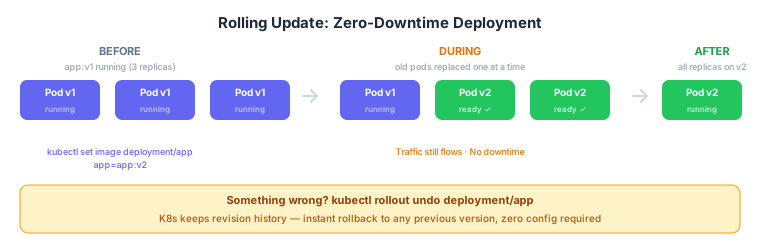
This is the operational win that makes Kubernetes worth the complexity.
kubectl set image deployment/api api=myrepo/api:v3Kubernetes doesn't kill all three pods and restart them. It:
- Creates a new pod running v3
- Waits for the readiness probe to pass
- Removes one v1 pod from the load balancer
- Repeats until all replicas are on v3
Traffic flows the entire time. At worst, some requests hit v1 and some hit v3 simultaneously — a trade-off you control with maxSurge and maxUnavailable in the Deployment spec. If the new pods never pass readiness, the rollout pauses automatically.
And rollback is one command:
kubectl rollout undo deployment/apiKubernetes keeps revision history. Every previous Deployment spec is stored; rollback rewrites the Deployment to the previous version and runs the same rolling process in reverse.
The real learning curve
The architecture diagram makes Kubernetes look complex because it is complex. The difficulty isn't understanding the objects — Pod, Deployment, Service are intuitive after an hour. The difficulty is:
- Debugging when something doesn't work:
kubectl describe pod,kubectl logs, reading events - Networking: understanding how kube-proxy, CNI plugins, and Ingress controllers layer on top of each other
- Storage: PersistentVolumes, StorageClasses, StatefulSets for anything with state
- RBAC: who can do what in which namespace
- Resource sizing: setting
requestsandlimitscorrectly without over-provisioning
The payoff is that once your application runs on Kubernetes, the operational model is the same whether it's one pod or a hundred, one service or fifty. The same tools, the same mental model, the same rollout procedure. That uniformity is what makes Kubernetes valuable at scale — not any individual feature.
Further reading: Kubernetes official docs, CKAD exam curriculum as a learning roadmap, The Kubernetes Book by Nigel Poulton for a practical intro.
Work with me
I consult with engineering teams on AI adoption, cloud architecture, and engineering effectiveness. If this post surfaced a challenge you're facing, let's talk.
Get in touch →Related posts
Explore more on these topics: